Seed to Spoon - Garden Planner
- 4.4
- Rating
- 100.00K
- Installs
- Free
- Price

 Analysis by App-foxy
I like gardening apps most when they help me make a decision at the exact moment I need one: what to plant, where to put it, and what to do next. Seed to Spoon - Garden Planner takes that practical approach rather than trying to turn gardening into a social network or a complicated spreadsheet. It is a free House & Home app from From Seed to Spoon that combines planning, plant tracking, growing guidance, and plant identification in one place.
After spending time with it, I see the app as a useful bridge between a paper garden notebook and a collection of separate gardening websites. It is especially comfortable for someone who wants visual help and reminders without building a full system from scratch. The experience is not perfect, and serious growers may eventually want more control than the app offers, but it gives beginners and casual gardeners a much clearer starting point than guessing from seed packets.
The app has been available since December 7, 2017, and its current version is 80020. It is rated for Everyone, works on Android 7.0 and later, and has passed 100K installs. Its average rating is 4.4 from about 6.3K ratings, with roughly 2.7K written reviews. Those figures suggest a healthy, established gardening tool rather than a brand-new experiment, although they do not remove the need to decide whether its particular workflow suits you.
You May Also Like

 Blood Strike: 2.5 Anniversary
Blood Strike’s Loadouts Turn Every Drop Into a Tactical Gamble
A close look at Blood Strike’s custom loadouts: how fast access to signature weapons reshapes its battle royale rhythm, rewards preparation, and narrows the gap between fights.

 Pandora - Music & Podcasts
Pandora’s Music Is Easy to Start, but Harder to Recover
Pandora’s strength is its low-effort path from a seed to a station. Its weak spot is how much confidence it asks you to place in connection, setup, and quiet recovery.

 8 Ball Pool
 Is Built on Rivalries, Rematches, and Routine
A close look at the rivalries, rematches, shared routines, and unanswered safety questions that turn a quick pool match into a persistent mobile community.

 Samsung Music
’s Quiet Strength Is Playing What You Already Own
Its reach comes less from spectacle than from dependable access to a personal library. That simplicity is both the app’s strongest retention engine and its ceiling.

 AccuWeather: Weather Radar
AccuWeather Review: A Quick, Clear Forecast for Everyday Decisions
For everyday plans, the best forecast is the one you can understand quickly. AccuWeather makes rain timing, radar, and local conditions easy to act on, with a few trade-offs.

 Hill Climb Racing
Why Hill Climb Racing Still Turns Crashes Into One More Run
A tiny car, a bumpy hill and one more upgrade: Hill Climb Racing keeps resurfacing because its simple chaos makes every near-miss feel personal.
More From Our News Desk
View All News


How I use it from an empty garden plan
Before I commit to a garden plan, I like to check how the planner, guides, tracking, and identification fit together, because a clear starting routine can prevent a lot of later tidying. I’ll focus on keeping the first setup manageable and choosing records that will actually help with decisions. From there, it’s easier to settle on a few habits that keep the plan useful as the garden changes.
Starting with the garden rather than a plant list
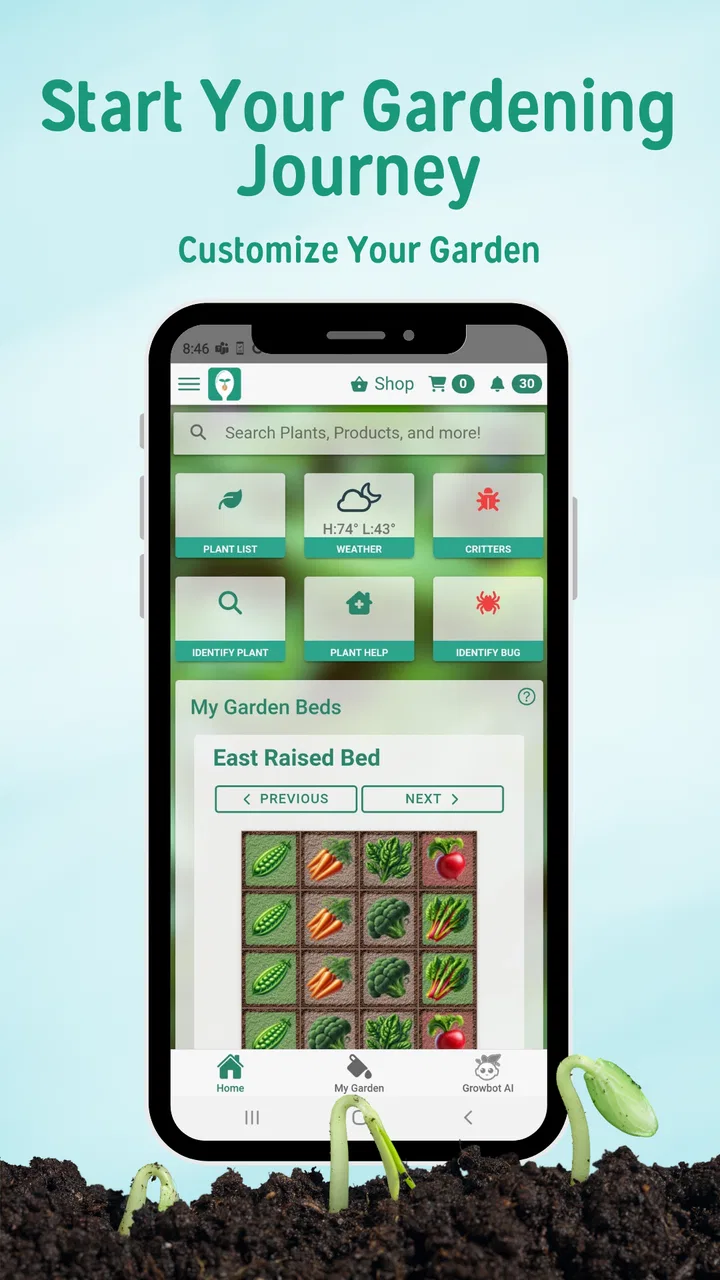
The most sensible way to begin is to think in terms of the space you actually have. Instead of immediately collecting every vegetable that sounds interesting, I would first sketch the available beds, containers, or growing areas in the visual planner. That small change in approach matters. A wish list of plants is easy to create; a realistic plan has to respect the room, timing, and attention you can give it.
The visual side is the app’s strongest first impression. It makes the garden feel like a layout that can be reviewed, not just a pile of plant names. I find that useful when deciding whether a new crop has a genuine place or is simply an impulse choice. It also gives me something to revisit before buying seeds, which is when many garden plans become unrealistic.
Once the layout is in place, I would add plants gradually and use the growing guides to check the basic requirements. The important habit is to treat the guide as a planning aid, not as an absolute promise. Local weather, soil, sunlight, container size, and the quality of the seedlings can all change the result. The app can organize the information, but it cannot inspect my garden and make every decision for me.
A practical weekend routine
A realistic use case is a Saturday morning before visiting a garden center. I can open the plan, review which spaces are still empty, check the plants I am considering, and avoid buying a third variety of something I already have room for. Later, after planting, I can use the tracking side to keep the garden record current instead of trying to remember everything from memory.
That record becomes more useful as the season progresses. I can look back at what I planted and connect later observations to the original plan. If one area performs poorly, the value is not only in knowing that it failed; it is in having a clearer record of what occupied the space and when I started paying attention to it. This is a simple workflow, but it is more reliable than relying on a handful of photos and a vague note saying “tomatoes near the fence.”
For a first-time gardener, the combination of visual planning and plant information reduces the number of separate decisions required. For an experienced gardener, it can serve as a lightweight seasonal dashboard. I would not expect it to replace a detailed crop journal, but it can make the everyday part of gardening less scattered.
Using identification without treating it as a diagnosis
The plant identification feature is convenient when I encounter an unfamiliar plant or lose track of a label. It is most useful as a first step: identify a likely plant, open its growing information, and then compare that guidance with what I can observe in person. A photo-based suggestion should prompt a closer look rather than end the investigation.
This distinction is important for weeds, pests, and plants with similar leaves. A wrong identification can lead to the wrong care decision, especially when a young plant has not developed its distinctive features. I would use the tool to narrow the possibilities, then check the plant’s location, growth pattern, smell, and other visible clues before acting.
That cautious workflow is one of the app’s better practical uses. It saves time without encouraging me to outsource all judgment. It is also a good reason to keep plant tracking organized: identification is more helpful when I already know what I intentionally planted in that part of the garden.
Settings, shortcuts, and habits that make the app easier to live with
I find that small, repeatable habits matter more than trying to document every detail, especially when plants are moved or plans shift mid-season. I’ll look at ways to keep the garden record practical and use identification as a sensible shortcut rather than a substitute for observation. Those choices also help distinguish an app problem from an issue with the garden itself.
Check the basics before filling the plan
When I set up any gardening app, I prefer to review its available options before entering a large amount of information. In this case, I would look through the available planning, tracking, guide, and identification areas first, then decide which parts match my habits. The goal is not to activate everything immediately. It is to create a simple routine that I will still use when the garden becomes busy.
A useful rule is to keep the first plan intentionally small. Add the crops that are definitely going into the garden, then expand it after the layout makes sense. This avoids a common mistake: spending time organizing hypothetical plants while the actual beds remain unclear. The visual planner works best when it reflects real intentions rather than every possibility I have considered.
I would also pay attention to how much detail I want to record. If I enter too little, the tracking feature becomes a vague list. If I enter every minor observation, maintaining the record can feel like another chore. A good compromise is to record events that will help with a later decision: planting, a notable change in growth, a problem, or a harvest-related observation.
Build a repeatable review habit
The app becomes more valuable when I open it at predictable moments instead of only when something goes wrong. I would review the plan before shopping, update it after planting, and check the relevant guide when a plant enters a new stage of growth. That rhythm turns the app from a reference shelf into a working garden notebook.
There is also a useful separation between planning and checking. I can use the visual layout to decide where something belongs, the growing guide to understand what it needs, and the tracking area to record what actually happened. Keeping those jobs distinct prevents the app from becoming a single crowded list where plans, instructions, and observations are mixed together.
For container gardeners, this habit is particularly practical. Containers are easy to rearrange, but that flexibility can make the garden difficult to remember. A quick update after moving a pot or replacing a plant keeps the visual plan meaningful. For a larger garden, the same principle helps prevent the opposite problem: assuming an entire bed is unchanged when several plants have already been removed or replanted.
Use identification as a shortcut, not the whole workflow
A faster pattern is to begin with the camera-based identification when I do not know what I am looking at, then move immediately to the plant’s guide and tracking record. That is more efficient than searching through long plant lists by guesswork. However, I would avoid using identification for every familiar plant. If I already know what I planted, manually opening its record is usually quicker and keeps the garden history cleaner.
Another small efficiency is to prepare the plan before the shopping trip rather than while standing in a store. The visual limits of the garden are easier to judge at home, where I can see the actual space. In the shop, attractive labels and unusual varieties can easily push the plan beyond what I can maintain.
Experienced users can also treat the app as a decision filter. Before adding a plant, I would ask three questions: does it have a place in the layout, do I understand its basic growing needs, and will I realistically track it? If the answer to any of these is no, the plant may be better left out until the plan is ready.
Where the free model fits
The app is free to download and use, which makes it easy to test without committing money at the beginning. It also includes in-app purchases ranging from $4.99 to $46.99 per item. I would approach those purchases as optional expansion rather than part of the basic decision to try the app. The right choice depends on how much of the planning and guidance experience I actually use.
For a small balcony garden, the free experience may be enough to decide whether the visual workflow helps. For someone managing a larger or more ambitious garden, it makes sense to use the app for a while before paying for anything. That trial period reveals whether I consistently return to the records and guides or whether I prefer a notebook and a few trusted references.
What the app does better than the usual alternatives
The common alternatives each solve only part of the problem. A paper notebook is flexible and works anywhere, but it does not provide the same guided plant reference or identification convenience. A general notes app is quick for typing, yet it usually lacks a garden-focused visual structure. Searching the web can provide deeper information, but it scatters advice across pages and makes it harder to connect research with the exact plants in my garden.
Seed to Spoon sits between those options. Its advantage is not that every individual feature is more powerful than a specialist tool. Its advantage is that planning, plant information, identification, and tracking are close enough together to support one repeatable routine. I spend less time deciding where to store information and more time using it.
The trade-off is depth. A paper system can be redesigned exactly around my preferences, while a dedicated specialist journal may offer more detailed records for soil conditions, weather, harvest weights, or experimental comparisons. If those details are central to my gardening, I would probably use this app alongside another record rather than expecting it to handle everything.
Limits that become clearer with serious use
The visual planner is helpful, but visual simplicity can also hide complexity. A real garden may involve changing sunlight, uneven soil, succession planting, companion-planting preferences, and crops that occupy the same space at different times. I would not assume that a neat layout automatically represents every practical relationship in the garden.
The growing guides also need personal interpretation. Gardening advice can vary by climate and season, so I would compare the app’s guidance with local planting conditions and what I have learned from previous years. A guide is most useful when it gives me a sensible starting point; it is less useful if I treat it as a rigid calendar that overrides local experience.
Tracking has a similar limitation: it depends on consistent input. If I stop updating the garden, the record becomes less trustworthy. That is not a flaw unique to this app, but it affects the value of the whole system. I would rather record three meaningful observations than create a detailed plan that I abandon after the first busy week.
There is also a difference between recognition and certainty. Plant identification can save time, but it should not be the only basis for removing a plant, applying treatment, or changing care. When the consequences matter, I would verify the result through additional observation or a reliable local source.
Who should use it, and who should skip it
I think the app is a strong fit for beginners who feel overwhelmed by seed packets and scattered advice. It is also suitable for people with a small garden, raised beds, or containers who want a visual overview without learning a complex database. Gardeners who enjoy trying different crops may appreciate having guides and identification close to the plan.
It is less suitable for someone who wants an extremely detailed scientific log. If I need precise experimental records, extensive harvest accounting, or a fully custom database structure, a dedicated spreadsheet or specialist garden journal may be better. Likewise, if I dislike entering updates or prefer a completely offline paper routine, the app’s organizational benefits may not justify changing my habits.
I would also skip it as my only source of advice if I garden in unusual conditions and need highly localized recommendations. The app can support my research, but local extension guidance, experienced growers, and direct observation may be more valuable for difficult climate or soil problems.
My verdict after building a routine around it
The real strength of Seed to Spoon is the connection between decisions. I can plan a space, look up a plant, identify something unfamiliar, and keep a record without moving between several unrelated systems. That makes it easier to develop a repeatable habit, which is often more useful than having one exceptionally advanced feature that I rarely open.
I would start with a modest layout, add only the plants I genuinely intend to grow, and use the guides as a reference rather than a command. After planting, I would record meaningful changes and use identification carefully when a plant is unfamiliar. Those habits make the app more reliable and prevent the common problem of turning a gardening tool into an abandoned list.
From Seed to Spoon has created a friendly, approachable app for House & Home use, and the Everyone rating makes it suitable for a broad audience. Its free entry point is another reason I would recommend trying it before choosing a more demanding system. The in-app purchase range means I would explore the basic workflow first and only spend money if the additional value is clear in my own garden.
My final recommendation is straightforward: try it if you want a visual garden plan with plant guidance and tracking in one place. I would recommend a notebook or a more specialized record-keeping tool instead if your priority is detailed experiments, harvest analysis, or total control over the structure. For ordinary home gardening, though, this app gives me enough organization to make better choices without making the hobby feel like office work.
FAQs for Seed to Spoon - Garden Planner
01What is Seed to Spoon - Garden Planner?
Seed to Spoon - Garden Planner is an app designed to help both novice and experienced gardeners plan, manage, and optimize their gardening efforts. It provides a comprehensive guide to growing various fruits, vegetables, and herbs. The app tailors recommendations based on your location and climate, ensuring you have the best information for successful gardening.
02How does Seed to Spoon help with garden planning?
The app offers a range of features that assist in garden planning, such as personalized planting schedules, plant-specific growing tips, and pest management advice. It utilizes your location to suggest optimal planting times and offers reminders for essential gardening tasks, making garden management efficient and straightforward.
03Can beginners use Seed to Spoon effectively?
Absolutely! Seed to Spoon is user-friendly, with a simple interface designed to accommodate beginners. The app provides step-by-step guidance on starting a garden, including selecting the best plants for your region, understanding soil requirements, and learning about watering and sunlight needs. It’s a great tool for those new to gardening.
04Are there any costs associated with using Seed to Spoon?
Seed to Spoon offers a free version with essential features, but there may be in-app purchases or subscriptions available for advanced features and additional content. This could include access to a more extensive plant database, advanced planning tools, or expert gardening tips. Check the app store for detailed pricing information.
05Does Seed to Spoon offer support for pest management?
Yes, one of the standout features of Seed to Spoon is its pest management support. The app provides detailed information on common garden pests and diseases, alongside organic and non-toxic solutions to manage them. This helps ensure your plants remain healthy and productive throughout the growing season.
Pros
- User-friendly interface for beginners.
- Comprehensive plant database available.
- Customizable garden plans and layouts.
- Weather integration for planting advice.
- Reminders for watering and fertilizing.
Cons
- Limited features in free version.
- Occasional syncing issues reported.
- Requires internet for full functionality.
- Some plants missing in the database.
- No option for community sharing.

Seed to Spoon - Garden Planner
Gallery